FFmpeg Basics

Contents
- Introduction
- Rewrap
- Transcoding
- Change Image Format
- Split A/V
- Video Excerpts
- Video to Image (and back)
FFmpeg? Whatisthat?
FFmpeg is a free and open-source software project consisting of a suite of libraries and programs for handling video, audio, and other multimedia files and streams.
At its core is the command-line ffmpeg tool itself, designed for processing of video and audio files.
Source: Wikipedia: FFmpeg
Where to get it from?
...from an Organic Farmer's Market.
Digital Video Trinity
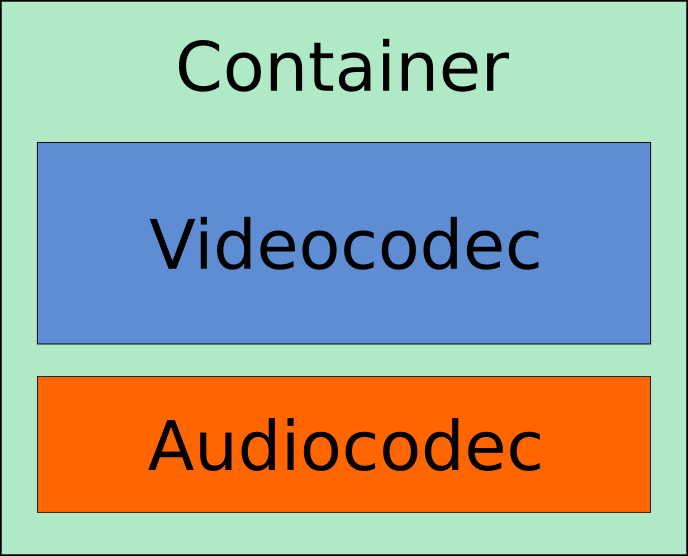
Basic Syntax
ffmpeg [-y] -i INPUT_FILE [PARAMETER] [-f FORMAT] OUTPUT_FILE
FFmpeg, what can you do?
- List Containers:
-formatsFile formats: D. = Demuxing supported .E = Muxing supported
- List Codecs:
-codecs/-encoder/-decoderCodecs: D..... = Decoding supported .E.... = Encoding supported ..V... = Video codec ..A... = Audio codec ..S... = Subtitle codec ...I.. = Intra frame-only codec ....L. = Lossy compression .....S = Lossless compression
Rewrap
ffmpeg -i INPUT_FILE -c copy -map 0 OUTPUT_FILE
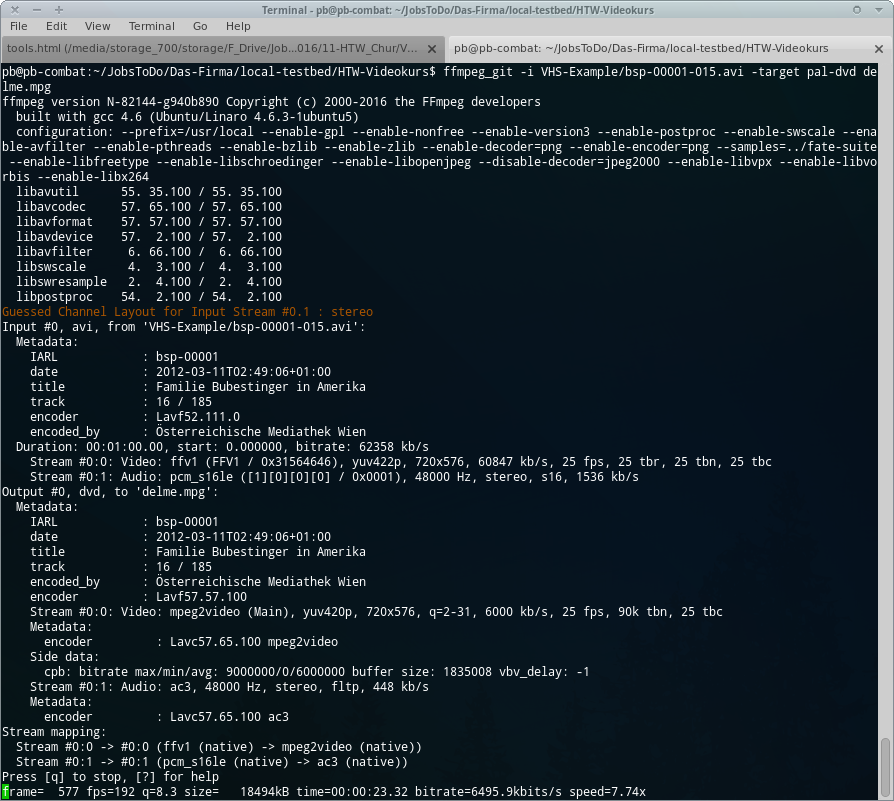
Check Result
ffprobe -i INPUT_FILE
ffprobe -i INPUT_FILE [-show_format] [-show_streams] [-of ...] [-pretty]
FFprobe Dokumentation
A/V separately
- Video 'None':
-vn - Audio 'None':
-an
Set Encoding Codec
- Videocodec:
-c:v CODEC - Audiocodec:
-c:a CODEC - Copy all streams 'as-is':
-c copy
Transcode
		ffmpeg -i INPUT_FILE
		-c:v ffv1
		-c:a pcm_s24le
		OUTPUT_FILE
ffmpeg -i INPUT_FILE -c:v ffv1 -c:a pcm_s16le OUTPUT_FILE
Video 1
- Resolution:
-s WIDTHxHEIGHT - Aspect Ratio (DAR):
-aspect X:Y - Framerate:
-r FPS
Change the "image"
ffmpeg -i INPUT_FILE -an -c:v ffv1 -vf scale=720:-1 OUTPUT_FILE
ffmpeg -i INPUT_FILE -an -c:v ffv1 -aspect 4:3 OUTPUT_FILE
ffmpeg -i INPUT_FILE -an -c:v ffv1 -r 30000/1001 OUTPUT_FILE
Video 2
- Color model / bit-depth:
-pix_fmt FORMAT
pix_fmt?
- yuv422p = YUV 4:2:2 planar
- yuv420p
- yuv422p10le
- yuv420p10le
- yuva422p
- "Keep-or-die":
-pix_fmt +
Show list: -pix_fmts
Change Subsampling
By simply setting the output pix_fmt 'as desired':
ffmpeg -i INPUT_FILE -c:v ffv1 -pix_fmt yuv422p OUTPUT_FILE
(Watch out: requires re-encoding!)
Audio
- Audiocodec:
-c:a CODEC - Samplerate:
-ar SAMPLERATE - Channels:
-ac CHANNELS - Bitrate:
-b:a BITRATE{k,M}
A/V separately
Video 3
- Bitrate:
-b:v BITRATE{k,M} - Bitrate (min):
-minrate BITRATE - Bitrate (max):
-maxrate BITRATE - GOP size:
-g FRAMES
Video Excerpts
- Start position:
-ss TIME_BEGIN - Backwards:
-sseof TIME - Length:
-t TIME_DURATION - End position:
-to TIME_END
FFmpeg's "TIME" SYNTAX:
Timecode: [-][HH:]MM:SS[.m]
or
Seconds: [-]S[.m]
Video Excerpts
- Start Offset:
ffmpeg -ss TIME_BEGIN -i INPUT_FILE -c copy OUTPUT_FILE - Only Beginning:
ffmpeg -t TIME_DURATION -i INPUT_FILE -c copy OUTPUT_FILE - Offset + Length:
ffmpeg -ss TIME_BEGIN -t TIME_DURATION -i INPUT_FILE -c copy OUTPUT_FILE - Absolute In/Out:
ffmpeg -ss TIME_BEGIN -to TIME_END -i INPUT_FILE -c copy OUTPUT_FILE
Transcoding II
FFV1
FFV1, which stands for "FF video codec 1", is a lossless intra-frame video codec.
- Codec:
-c:v ffv1 - Version:
-level {1,3} - Coder:
-coder {0=golomb,1=range} - Context:
-context {0=small,1=large} - Slices:
-slices {4,6,9,12,16,24,..} - CRC:
-slicecrc {0,1}
Quellen: Wikipedia: FFV1, ffv1.info
FFV1
	ffmpeg -i INPUT_FILE
	-an
	-c:v ffv1
	-level 3
	-slices 24
	-slicecrc 1
ProRes
"Apple ProRes is a lossy video compression format developed by Apple Inc. for use in post-production"
- Codec:
-c:v {prores,prores_aw,prores_ks} - Profiles:
-profile:v {proxy,lt,standard,hq,4444,4444xq}
Quellen/Links: Wikipedia: Apple ProRes, FFmpeg docs, Kieran Kunya's Blog, FinalCut docs
ProRes
	ffmpeg -i INPUT_FILE
	-an
	-c:v prores_ks
	-profile:v hq
H.264
"x264 H.264/MPEG-4 AVC encoder wrapper. [...]
libx264 supports an impressive number of features, [...]"
- Codec:
-c:v libx264 - Bitrate:
-b:v BITRATE{k,M} - CRF:
-crf 0 (lossless) - 51 (worst) - Presets:
-preset:v {ultrafast,superfast,veryfast,faster,fast,medium(*),slow,slower,veryslow} -
Feintuning:
-tune {film,animation,grain,...}
Quellen/Links: FFmpeg Wiki, FFmpeg docs
H.264
ffmpeg -i INPUT_FILE -an -c:v libx264 -preset:v superfast -crf 22
From Video to Image
    ffmpeg -i input.mp4
    -an out/delme_%04d.png
    -vn -c:a pcm_s16le out/delme.wav
From Image to Video
    ffmpeg -r $FPS -start_number $FRAMENO -i out/xxx_%04d.png -i out/xxx.wav
    -c:v libx264 -crf 22
    -c:a aac -b:a 128k
    output.mkv
Links
License and Credits
Der Text dieser Präsentation steht unter einer freien Lizenz zur Verfügung:
Creative Commons "Attribution-ShareAlike"
(CC-BY-SA)

Peter Bubestinger-Steindl
(Peter@ArkThis.com)